
Why Clean Uninstall?
Visual Studio 2015 comes with a lot of dependency and when you uninstall it through the Program Features. It is only uninstall the main product which is the IDE itself. It doesn’t uninstall the rest of the product. This step will guide you to do clean uninstallation for Visual Studio 2015 Update 3 and then prepare to Install Visual Studio 2017
Step-by-Step Solution
- Install the Visual Studio Uninstaller at here https://github.com/Microsoft/VisualStudioUninstaller/releases
- Extract the TotalUninstaller folder on your hard drive
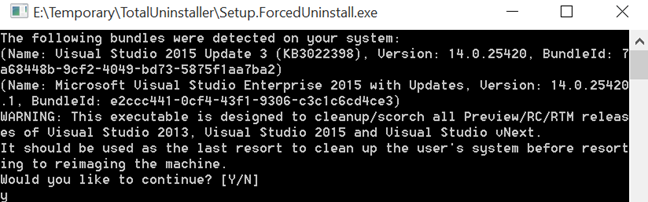
- Open the folder, please find Setup.ForcedUninstall.exe
- Run it, with right click and ‘Run as Administrator’
- Answer ‘Y’ to uninstall the product
- Please wait for less than 1 hour. If it’s more than that feel free to close it and restart the uninstaller. If still fail, it will be a good time to refresh your Windows
Leave a Reply