
A good way does not always a good thing
We already know that Azure DevOps and many project management tools provide a good way to manage a project. However, sometimes it doesn’t work for your team. This article will discuss how to implement Lean Software Development Process with small investment for small startup. This article is a next chapter of this article. Let’s get started
What you need
- Microsoft Teams you can obtain free at teams.microsoft.com
- Microsoft OneNote you can obtain free at onenote.com
- Source codes versioning you can obtain free from github.com or visualstudio.com
How we do that
- Create your Microsoft Teams Group Chat. You can follow this guide
- Create a new tab in Microsoft Teams and add OneNote Tabs. You can follow this guide
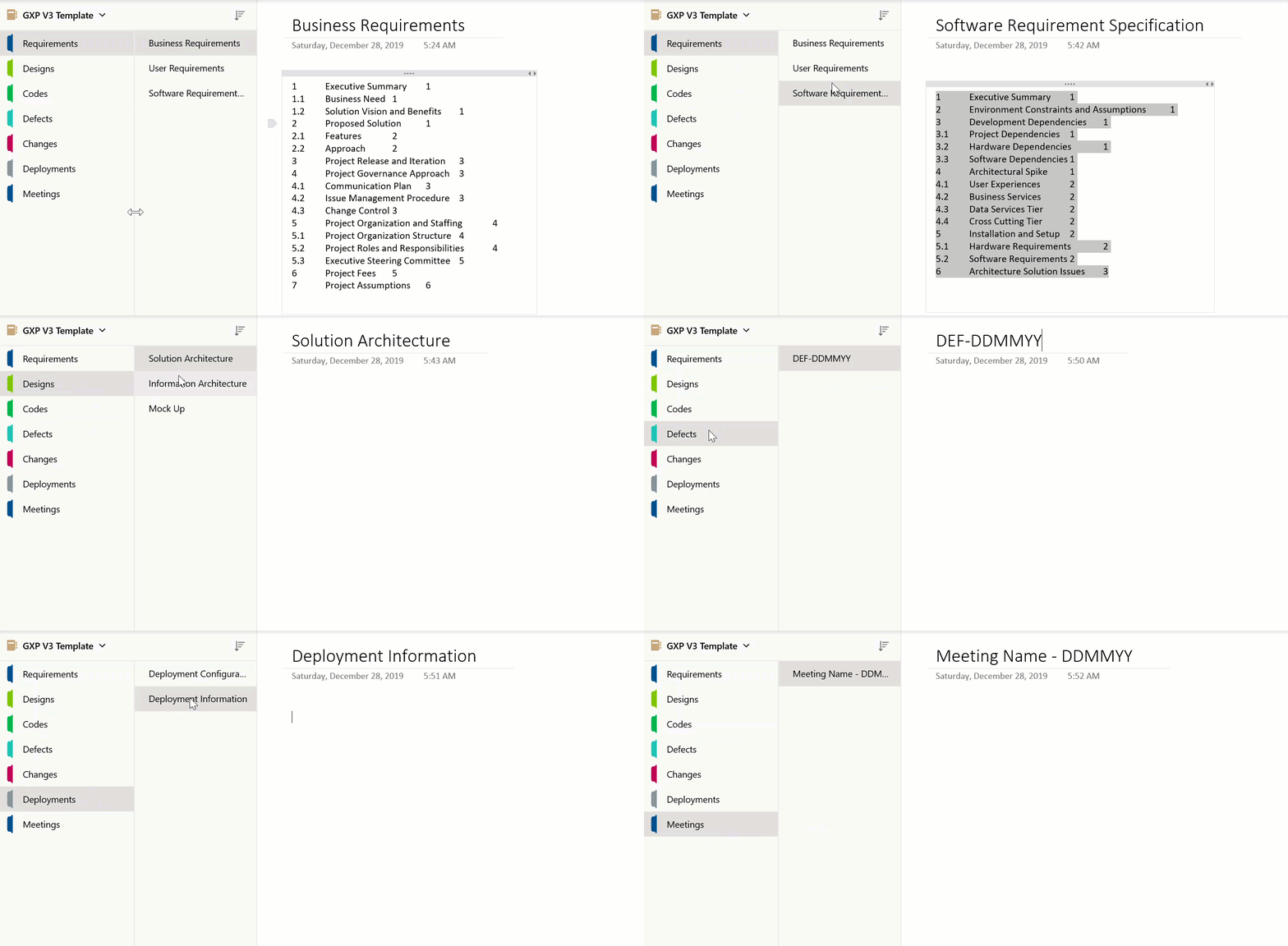
- Add seven section on your Microsoft OneNote
- Requirements: providing a clear requirement for business, users, and solutions
- Design: providing a detail of your solution. It includes solution architecture, information architecture, and mock-up
- Codes: providing lost and found snippet from the internet (Stack overflow and others)
- Defects: list of defects that founded by the tester or customer
- Changes: list of changes that requested by the customer
- Deployments: list of deployments information such as publish profile, YAML template, and any credentials that needed to access the system. You can protect it with the password if necessary
- Meeting: list of meeting notes
Leave a Reply