
Problem
You click the search bar and the search bar is not responsive. You can’t type or search with anyway through start menu.

Possible Cause
Corrupted index happens on your account
Solution
Option A – Rebuild Your Index
- Go to setting
- Find / search indexing option
- On indexing option, click Advanced à Troubleshooting à Rebuild Index
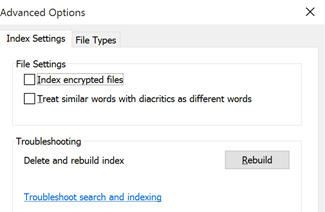
- Please wait for 5-15 minutes (on my 512 GB SSD it takes for 10 minutes)
- Restart your computer
Option B – Troubleshoot
- If the first option can’t solve your problem, go the index setting and choose, Troubleshoot search and indexing
- Follow the screen and restart your computer
Option C – Fixing your Index through Another Account
- Add others user on your computer by visiting Setting – Account – Family & Others Users – Other Users
- Add other users by inputting their email (outlook / live email)
- Log off your account
- Login with the new account
- Please wait until you see a start menu, and search bar that can work for you
- Log off from the new account
- Log in with your account
- Restart your computer
That’s all J
Leave a Reply