
Visual Studio 2013 is there, it is a weekend, so if you have a good time with your family and have no problem with these issues you can sfaely remove your Visual Studio 2012. This tutorial will show you a quick and safe uninstallation. For more detail you can reach this page http://support.microsoft.com/kb/2771441
Here are the step:
- Open the add reove programm uninstall your visual studio 2012

- Uninstall the update for the products, by clicking View Installed Update
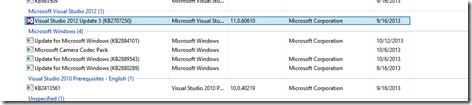
- Uninstall the related SDK such as Windows Phone 8 SDK, Windows Azure SDK, Office SDK, InstallShield LImited Edition and others. However, you don’t need to uninstall the SQL Server 2012 or any others related product with your TFS such as Microsoft Office
- Restart your PC
- You can install the Visual Studio 2013, now
Enjoy the new blast of Visual Studio 2013, next post will describe the new ALM features of Visual Studio
Cheers,
@ridife
Leave a Reply