
The mistake almost everyone makes first
The first thing most of us did when AI tools arrived was pick one and try to make it do everything. You open a chat window. You ask it to summarize your inbox, then to write a Python script, then to design a slide, then to think through whether your team should move from a monolith to services. Some of those answers come back brilliant. Some come back confidently wrong. After two weeks you conclude the tool is “overhyped” and you go back to doing things by hand, except now you also feel vaguely guilty about it. The problem was never the tool. The problem was that you hired one person and gave them four jobs. Think about how a real IT team works. You do not ask your project manager to write the CI pipeline. You do not ask your backend engineer to run the stakeholder workshop. Each role has a shape, and the work flows between them through handoffs. The handoff is where the value lives, not inside any single head.
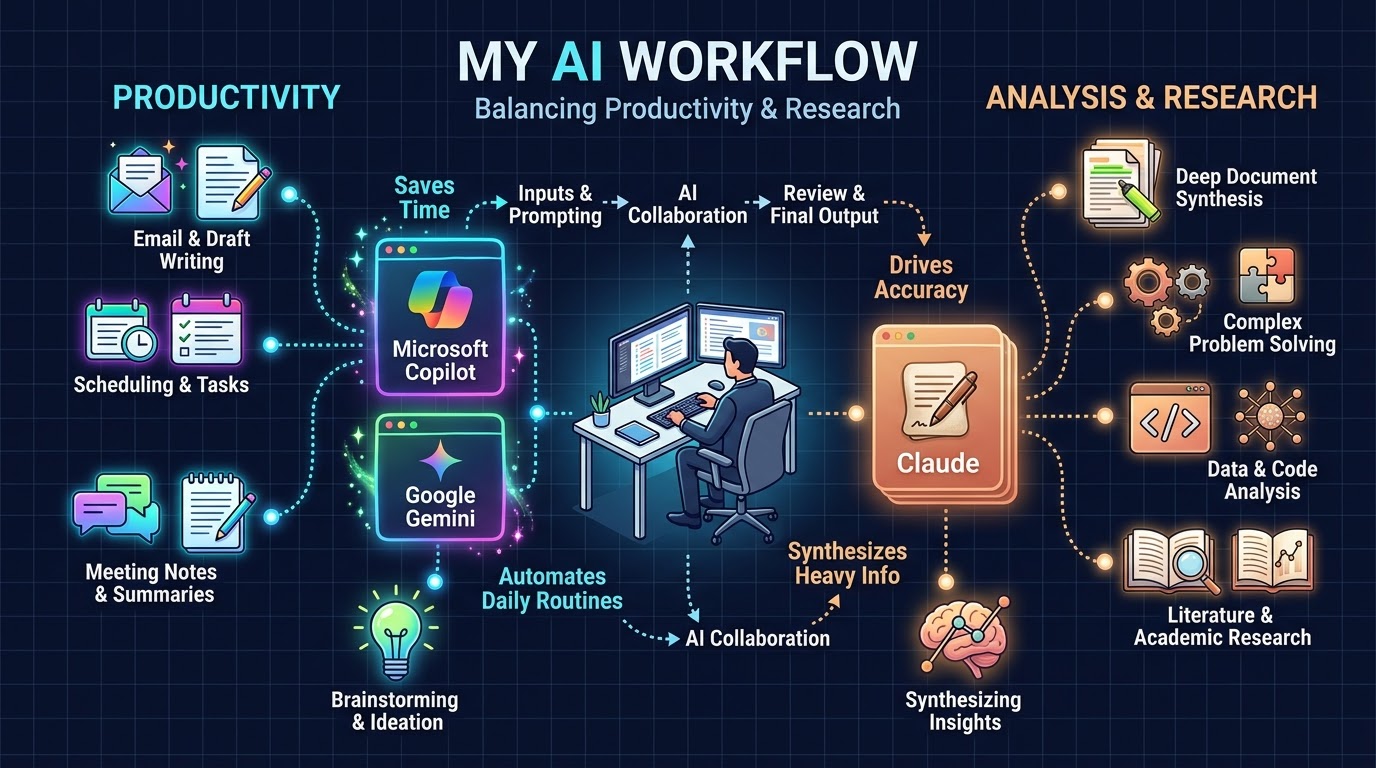
AI works the same way. Once you stop asking “which AI is best” and start asking “which AI plays which role,” your output changes shape. This article walks through a single working day, step by step, with four tools assigned to four roles:
| Tool | Role on your crew | What it owns |
|---|---|---|
| Microsoft Copilot | Chief of staff | Email, calendar, meetings, documents, status reporting |
| Gemini | Creative director | Ideation, visuals, multimodal input, exploratory research |
| GitHub Copilot | Pair programmer | Code in the editor, tests, refactors, pull request review |
| Claude | Analyst and project manager | Requirements, trade-offs, architecture reasoning, planning, long document synthesis and analysis |
These are not the only valid assignments. If your shop runs on Google Workspace instead of Microsoft 365, Gemini takes over the chief of staff role too. The casting matters less than the principle: give each tool a lane, and design the handoffs between lanes deliberately.
Let us walk through the day.
Step 1, 08:30. Open the day with your chief of staff, not your inbox
You have 61 unread emails, three Teams channels with red dots, and a calendar that starts at 10:00. The old move is to open Outlook and start at the top. That is how you lose your first ninety minutes to other people’s priorities.
Instead, start with a triage pass.
Summarize everything that arrived in my inbox and Teams mentions sinceyesterday 17:00. Group into three buckets:1. Needs a decision from me today2. Needs a reply but not urgent3. FYI only, no actionFor bucket 1, give me one line on what the decision actually is and whois waiting. Do not summarize threads I was only CC'd on.
Microsoft Copilot is the right tool here for one unglamorous reason: it has grounded access to your actual tenant. Your mail, your calendar, your Teams threads, your SharePoint files. No other tool in this crew can see that data, and pasting it into a general chat window is both tedious and, depending on your organization’s policy, a compliance problem.
What you get back is usually eighty percent right. It will miscategorize something. It will miss the urgency in a short email that said only “can we talk.” Treat it as a first pass from a competent junior, not as gospel. Read bucket 1 yourself, always.
Then a second prompt, which is the one that actually saves the morning:
For each item in bucket 1, draft my reply in my usual tone: direct,short, no filler. Where I need more information before I can answer,draft a question instead of an answer.
The value is not that the drafts are good. The value is that staring at an empty reply box costs you about forty seconds of activation energy per email, and editing a mediocre draft costs you about ten. Multiply by fifteen emails.
Where this fails. Copilot is weak at judgment calls that depend on history it cannot see: office politics, a conversation you had in the hallway, the fact that this particular vendor always lowballs the first estimate. It is also noticeably worse at Indonesian-language threads with heavy code switching. Do not let it reply to anything with contractual or legal weight without reading every word.
Anti-pattern to avoid. Letting Copilot auto-send. Every drafted reply goes through your eyes. The one time it does not is the time it cheerfully confirms a deadline you cannot meet. If you already has Google Workspace you can use Gemini for sure!
Step 2, 09:15. Hand the day’s real problem to your analyst
By now the noise is cleared and you know what actually matters. Today it is this: your team has been asked to decide whether the new internal reporting service should be built on the existing monolith or stood up separately, and the answer is due at Thursday’s architecture review.
This is not a coding task. It is not a creative task. It is an analysis and planning task, and this is where Claude earns its seat.
The move here is to give it everything, not to give it a question. People underuse long-context models by feeding them a one-line question and then complaining the answer is generic. Feed it the actual material:
I need to decide whether to build a new internal reporting serviceinside our existing monolith or as a separate service.Attached: our current architecture doc, last quarter's incident report,the monolith's deployment runbook, and the requirements draft fromthe finance team.Context you will not find in the documents:- Team is 6 engineers, 2 of them junior, nobody has run Kubernetes in production before- Our release cadence is every two weeks and stakeholders hate that it is not faster- The monolith's test suite takes 40 minutes and is flaky- Budget for new infrastructure this year is effectively zeroDo not give me a recommendation yet. First, lay out the decision as atrade-off table across the dimensions that actually matter here. Flagwhich dimensions I have not given you enough information to assess.
That last instruction is the one that changes everything. Asking for a recommendation first invites the model to pick a side and then assemble supporting arguments, which is exactly the failure mode you are trying to avoid in yourself. Asking for the trade-off space first forces the reasoning into the open where you can argue with it.
Then you argue with it. Genuinely. Push back:
Your table treats "team capability" as a soft factor. I think it is thehard constraint and everything else is downstream of it. Rebuild theanalysis with that as the primary axis and tell me if the conclusionchanges.
Three or four rounds of this and you will have a decision you can defend, plus a written trail of why you rejected the alternatives. That trail is the thing your architecture review actually needs.
Once the decision is made, keep Claude in the PM chair:
Decision made: separate service, deployed on the App Service plan wealready pay for, no Kubernetes.Break this into a delivery plan: milestones, the sequence of work, whatcan run in parallel, and the three risks most likely to blow theschedule. Assume two engineers on it, six week window.
Where this fails. Claude will reason fluently about systems it has never seen running, which means it can produce a plan that is internally coherent and operationally naive. It does not know that your deployment pipeline has a manual approval gate that takes two days because one person is always on leave. Every plan it produces needs a pass from someone who knows the terrain.
Anti-pattern to avoid. Accepting the first analysis. If you are not disagreeing with it at least once, you are using it as a search engine with better grammar.
Step 3, 10:00. The meeting, and what happens after it
You go to the architecture sync. Copilot sits in the meeting, or you record it, depending on what your organization allows.
The temptation afterward is to ask for a summary. Resist it. Meeting summaries are the least useful artifact AI produces, because nobody reads them and they flatten the one thing that mattered. Ask for the specific thing instead:
From this meeting:1. Every commitment someone made, with their name and the date they committed to2. Every open question that was raised and not resolved3. Anything that contradicts what was decided in last month's architecture syncSkip the discussion summary.
Item 3 is the sleeper. Cross-meeting contradiction detection is something no human does reliably, because it requires holding two meetings in your head at once. The tool holds both.
Push the commitments straight into wherever you track work, and move on.
Step 4, 11:00. Bring in the creative director
The reporting service needs a dashboard, and the finance team’s requirements document describes it in the way finance teams always do: “a clear overview of key metrics with drill down capability.” That sentence contains no design information whatsoever.
This is where you switch tools, because this is a divergent problem and you want range, not rigor.
Gemini’s advantage here is multimodal input combined with a genuinely different generative character. Screenshot three dashboards you like, three you hate, and the finance team’s existing Excel report. Then:
Attached: 7 images. The first three are dashboards I think work well.The next three are ones I think fail. The last one is the Excel reportmy finance team currently uses every month, which the new dashboardhas to replace.First, tell me what the three good ones have in common that the threebad ones do not. Be specific about layout and information hierarchy,not aesthetics.Then propose 5 genuinely different layout directions for replacingthat Excel report. Different, not five variations of the same grid.For each, say what kind of user it serves best.
You will get five directions. One will be obvious, two will be bad, one will be strange, and one will be something you would not have thought of. That one is why you ran the prompt.
Gemini is also where exploratory research belongs. When you need to understand a space rather than answer a question, its deep research mode will go wide and come back with a map. Use it for “what approaches exist for X” questions, not for “what should I do” questions. Mapping is a creative act. Deciding is an analytical one, and that goes back to Claude.
Where this fails. Creative range and factual precision pull in opposite directions. Anything Gemini tells you about a specific library version, pricing tier, or API signature needs verification. It is a brainstorming partner, not a reference manual.
Anti-pattern to avoid. Asking for a decision. “Which of these five should I build?” throws away the reason you came here. Take the five back to your analyst.
Step 5, 13:30. Sit down with your pair programmer
Lunch is over. You have a decision, a plan, and a layout direction. Now you write code, and GitHub Copilot lives in the editor because that is where code happens.
The single highest-leverage thing you can do here costs you twenty minutes once and pays out for the life of the repository: write a custom instructions file. Most teams never do this, which is why most teams think Copilot is “just autocomplete.”
In .github/copilot-instructions.md:
Project conventions C# 12, .NET 8, nullable reference types enabled Repository pattern, no direct DbContext access from controllers All public methods need XML doc comments Tests use xUnit and FluentAssertions, arrange-act-assert, no Moq for simple fakes Never catch Exception. Catch specific types or let it propagate Async methods always end in Async and always take a CancellationToken
Now completions arrive already shaped like your codebase instead of like the average of GitHub. The difference is not subtle.
With that in place, the day’s work has three modes.
Mode one, inline completion. Type, accept, move. You stop thinking about it after a week. Nothing to prompt here.
Mode two, chat for the parts you know are tedious. Highlight a method and ask:
Generate xUnit tests for this method. Cover the null input case,the empty collection case, and the case where the repository throws.Follow the conventions in the instructions file.
Test generation is the highest value, lowest risk use of a coding assistant. The tests are mechanical, you review them in thirty seconds, and the coverage is real.
Mode three, agent mode for scoped multi-file changes. This is the one that requires discipline. The rule is: narrow scope, clear acceptance criteria, you review every diff.
Add a ReportSchedule entity following the existing entity patterns inthis project. It needs: migration, repository interface andimplementation, DI registration, and unit tests for the repository.Do not touch the controller layer. Do not modify existing entities.
The “do not” lines matter more than the “do” lines. An unconstrained agent will helpfully refactor three files you did not ask it to touch, and you will find out in code review.
Where this fails. Copilot is pattern completion with context. It is excellent at code that resembles code it has seen, which means it is excellent at your fifteenth CRUD repository and mediocre at your one genuinely novel algorithm. It also has no idea whether what it wrote is secure. Static analysis and a human reviewer are not optional.
Anti-pattern to avoid. Accepting code you cannot explain. If you could not defend it in review, do not commit it. This is not a moral position, it is a practical one: you will be the person debugging it at 23:00.
Step 6, 16:00. Close the loop back through the analyst
You have written code for two hours. You are deep in the details and you have lost the thread of whether the thing you built still matches the plan from this morning.
Go back to Claude, in the same conversation or project where the plan lives, and hand it the diff:
Here is what I actually built today, as a diff. Compare it against thedelivery plan from this morning.What drifted? What did I skip? Is there anything in what I built thatinvalidates an assumption in the plan?
This is the handoff most people never make, and it is the one that compounds. Code review catches whether the code is correct. Almost nothing catches whether the code is still solving the problem you set out to solve. A model that holds both the plan and the diff in context does.
Step 7, 17:00. Status, in two minutes
Back to the chief of staff. It has your calendar, your Teams, your files.
Draft my weekly status update for the reporting service workstream.Audience is the steering committee, who care about dates and risks andnothing else. Three sections: done this week, next week, blockers.Maximum one page. Pull what you can from my calendar and the projectchannel.
Edit for the two things it will get wrong: it will overstate progress, and it will soften blockers. Fix those by hand, send, done.
The four handoff patterns
Walk back through that day and you will notice the tools never did each other’s jobs. They passed work between them. Four patterns recur often enough to name:
Diverge then converge. Gemini generates options, Claude evaluates them. Never let the tool that generated an idea be the tool that judges it, for the same reason you do not let an author edit their own copy.
Decide then build. Claude produces the plan and the constraints, GitHub Copilot implements inside them. Code written before the decision is made is code you will delete.
Build then reconcile. The diff goes back to the planner. Drift is found while it is cheap to fix.
Ground then generalize. Copilot extracts the facts from your actual tenant (what was committed, by whom, when), and those facts become the input to the analysis. The tool with access to real data gathers, the tool with reasoning depth interprets.
The thing all four share: you are the bus. Context does not move between these tools by itself. You carry it. That is the actual job now, and it is a real skill, not a workaround for a temporary limitation.
Governance, which is the boring part that keeps you employed
Everything above assumes you are allowed to do it. Settle that before you build the habit, not after.
Three questions, answered in writing, for your own organization:
What data is allowed in which tool? The honest default for most IT workers: customer data and credentials go nowhere. Internal code goes only into the tool your organization has a commercial agreement with. Public or already-published information goes anywhere. Write this down as a one-page classification and stick it on the wall. The failure mode is not malice, it is a tired engineer at 19:00 pasting a stack trace that happens to contain a connection string.
Who is accountable for AI-assisted output? You are. Always. “The AI wrote it” has never once worked as a defense and it will not start now. If your name is on the commit, the analysis, or the email, you own it.
What is the audit trail? For anything that feeds a real decision, keep the prompt and the reasoning alongside the output. Not for compliance theater, but because in four months somebody will ask why you chose a separate service, and “the AI suggested it” is a worse answer than the trade-off table you actually have.
For regulated environments, add one more: check whether your tenant’s AI features are covered by the same data residency and retention terms as the rest of your tenant. They often are not, and the gap is usually in the consumer-tier versions of these same tools.
How to tell whether it is actually working
Most measurement of AI productivity is nonsense, because the obvious metrics are the easy ones to game. Lines of code generated means nothing. Number of prompts means less.
Five that tell you something real:
- Time from problem stated to decision defended. Should drop noticeably. If it has not, you are using AI for output rather than for thinking.
- Percentage of AI-generated code that survives code review unchanged. If it is near 100%, your review is not real. If it is near zero, your context setup is broken. Healthy is somewhere in the middle.
- Rework rate. Are you shipping faster and then fixing more? That is not a win, it is a loan.
- Decisions you can still explain a month later. If you cannot reconstruct the reasoning, the tool did the thinking and you did the typing, which is the wrong way around.
- Hours reclaimed, and where they went. If every hour saved on email is immediately eaten by more email, you have optimized a treadmill.
The failure modes you will hit
Context amnesia. You start a new chat and re-explain your entire project for the fourth time. Fix: use persistent project workspaces for your long-running threads, and keep a short living document of project context that you paste in as a header. Twenty lines of context pasted at the top of a conversation outperforms four paragraphs of clever prompting.
Confident wrongness. Every one of these tools will state something false in the same tone it states something true. There is no tell. Fix: never accept a factual claim in a domain where you cannot detect an error. If you cannot verify it, treat it as a hypothesis.
Tool sprawl. You end up with seven AI subscriptions and use two. Fix: the four roles above. If a new tool does not displace an existing role, you do not need it.
Skill atrophy. This one is real and underdiscussed. If you never write the first draft, your ability to write first drafts degrades. If you never debug without help, your debugging intuition dulls. Fix: deliberately do some work unassisted. Pick one task a week. Treat it like keeping your hand in.
Prompting as a substitute for thinking. The most common failure of all. A vague question produces a vague answer, and the vagueness was yours. Fix: if you cannot state the problem clearly to a human colleague, you are not ready to state it to a model.
Your first week
Do not try to adopt all of this on Monday. Add one role per day and let each one become a habit before stacking the next.
Day 1. Inbox and meeting triage with Copilot only. Nothing else changes. Notice how much of your morning was spent on sorting rather than deciding.
Day 2. Add the analyst. Take one real decision you are facing, give it full context, and argue with it for fifteen minutes. Keep the trade-off table.
Day 3. Write your copilot-instructions.md. Twenty minutes. Then spend the day noticing how completions changed.
Day 4. Add the creative director. Take one problem where you are stuck in a single solution and ask for five genuinely different directions.
Day 5. Run one complete handoff chain end to end on a small piece of real work: diverge, converge, build, reconcile. This is the day it clicks.
Weekend. Write your one-page data classification rule. You will be glad you did it while it was theoretical.
What this is really about
The shift is not from doing the work to having AI do the work. That framing is why so many adoption efforts stall, and it is also why so many people feel quietly threatened by it.
The shift is from being the person who produces the artifacts to being the person who directs the production and owns the judgment. You decide what question is worth asking. You decide which answer is good enough. You carry the context between the specialists, because none of them can see the whole picture and you can.
That is not a smaller job. For most IT workers it is a considerably harder one, and it is the part that does not automate, because it was never about typing speed in the first place. Beware that more AI that you have more ccommitment that you need to pay. My recommendation is simple
- Gemini or Copilot Pro for your productivity
- Claude for your research and development
Start Monday. One role.
Leave a Reply