
The right local model is the largest one that fits your memory with room to spare and still answers fast enough to be useful. You can measure both before you download anything.
Every week a new open model appears with a bigger number in its name. Grab the largest one and your laptop fan screams, the cursor freezes, and a minute later you get three words of output. Running AI locally is a fitting problem, not a bragging problem.
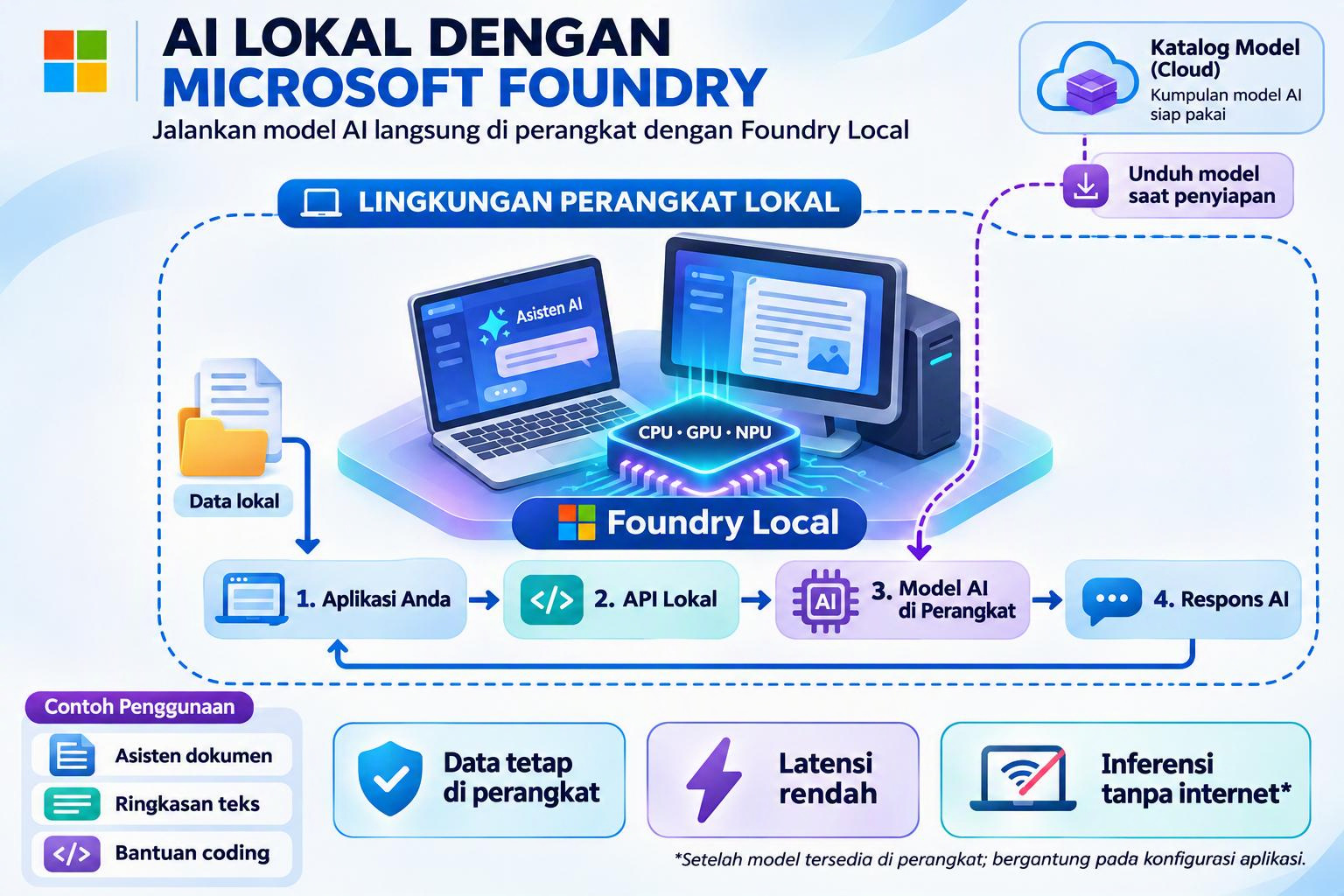
In this article we use simple math, then confirm the result with Microsoft Foundry Local, a free on device runtime that runs models through a CLI, SDK or REST API. Foundry Local is useful for this lesson because it detects your hardware and picks the best variant of a model in the order NPU, then GPU, then CPU. That makes it one of the few easy ways to put the NPU in your AI PC to work.
We focus on two common devices: a CPU only laptop (8 to 16 GB RAM, no discrete GPU) and a Mini PC or AI PC with an NPU (Intel Core Ultra, AMD Ryzen AI or Snapdragon X class, 32 GB RAM).
Foundry Local is in public preview, so commands may change. The examples below follow the current CLI reference.
Step 1: Know your device
You need five facts about your machine before you pick a model.
| What to check | Why it matters | Where to find it (Windows 11) |
|---|---|---|
| Total and free RAM | The whole model must sit in memory | Task Manager > Performance > Memory |
| Memory speed (MT/s) | On CPU, token speed is limited by memory bandwidth | Task Manager > Performance > Memory > Speed |
| NPU present | Decides whether Foundry Local can pick an NPU variant | Task Manager > Performance > NPU |
| NPU driver version | Foundry Local only uses the NPU with a supported driver | Device Manager > Neural processors |
| Free SSD space | Each model is a multi GB download | File Explorer |
NPU support depends on the vendor plugin. On Windows, Foundry Local downloads an execution provider for your chip on first run:
- Intel Core Ultra: OpenVINO execution provider, plus the Intel NPU driver for best acceleration.
- AMD Ryzen AI: Vitis AI execution provider, which needs a specific Adrenalin and NPU driver range.
- Qualcomm Snapdragon X Elite / X Plus: QNN execution provider for the Hexagon NPU.
Two things to remember. First, the NPU has no memory of its own: it shares system RAM, so your RAM budget still decides what fits. Second, an NPU usually wins on power use, not always on raw speed. We will measure that in Step 5.
Step 2: The sizing formula
A model needs memory for three things: model weights + KV cache + headroom.
1. Model weights. Multiply the parameter count by the bits per weight, then divide by 8.
weights (GB) ≈ parameters (billions) × bits per weight ÷ 8
An 8B model at 16 bit needs about 16 GB. At 4 bit it needs about 4 to 5 GB. Foundry Local ships most models as optimized ONNX files, and a single alias such as phi-4-mini maps to several hardware variants (CPU, GPU, NPU), each with its own file size.
2. KV cache. This is the model’s short term memory of the conversation, and it grows with context length. For a 7B to 8B model, budget about 0.5 GB for 4K tokens and 1 GB for 8K tokens.
3. Headroom. Windows, your browser and the Foundry service need memory too. Reserve 4 to 6 GB for the system, then keep about 20% of the rest free. A quick rule: have about 2× the model file size in free RAM.
Real sizes from the Foundry Local catalog
| Alias | Params | CPU variant | GPU variant |
|---|---|---|---|
| phi-3.5-mini | 3.8B | ~2.5 GB | ~2.2 GB |
| phi-4-mini | 3.8B | ~4.8 GB | ~3.7 GB |
| deepseek-r1-7b | 7B | not listed | ~5.6 GB |
| phi-4 | 14B | ~10.2 GB | ~8.4 GB |
| deepseek-r1-14b | 14B | not listed | ~10.3 GB |
These sizes come from published catalog listings and change between releases. Always confirm with foundry model list on your own machine, because it shows the variants for your hardware only.
Step 3: Estimate speed before you download
On a CPU, every new token means reading the whole model from RAM once, so speed is mostly a memory bandwidth problem:
tokens per second ≈ (memory bandwidth × 0.6) ÷ model size in GB
The 0.6 factor reflects that real systems reach roughly 50 to 70% of theoretical bandwidth.
| Memory | Theoretical bandwidth (dual channel) |
|---|---|
| DDR4 3200 | ~51 GB/s |
| DDR5 5600 | ~90 GB/s |
| LPDDR5X 7500 | ~120 GB/s |
For comfortable chat, aim for at least 8 to 10 tokens per second. Below 4 tokens per second, most people give up. The NPU and integrated GPU read from the same RAM, so this formula is a fair first estimate for them too; the real number comes from measuring.
Step 4: Read the catalog in Foundry Local
Foundry Local tells you which variants exist for your hardware. Install it and explore from a terminal:
# Install (Windows)winget install Microsoft.FoundryLocal# First run downloads the execution providers for your chipfoundry model list --type chat# What can run on each device?foundry model list --device npufoundry model list --device gpufoundry model list --device cpu# Details for one modelfoundry model info phi-4-mini# Run by alias: Foundry picks the best variant (NPU > GPU > CPU)foundry run phi-4-mini# Run a pinned variant by full model ID, for example CPU onlyfoundry run qwen2.5-0.5b-instruct-generic-cpu# Housekeepingfoundry cache listfoundry status
How to read the results:
- An empty
--device npulist means your NPU or driver is not supported yet. Update the driver, then run the command again. - The alias is the shortcut, the model ID is the contract. Running an alias lets Foundry choose; running a full ID pins one variant, which you need for fair comparisons.
- The size column is your input to Step 2. Plug it into the formula before you download.
- Older CLI versions use
foundry model list --filter device=NPUandfoundry model run <alias>. Checkfoundry --helpif a command is not found.
Worked example A: 16 GB CPU only laptop
Device: 16 GB DDR4 3200, no discrete GPU, no NPU. Foundry Local will pick CPU variants.
Memory budget: 16 GB minus about 5 GB for Windows and a browser leaves 11 GB. Keep 20% free, so the budget is about 9 GB.
| Candidate (CPU variant) | File size | KV (4K) | Total | Speed estimate | Verdict |
|---|---|---|---|---|---|
| phi-3.5-mini | ~2.5 GB | 0.4 GB | ~2.9 GB | 51 × 0.6 ÷ 2.5 ≈ 12 t/s | Fast daily driver |
| phi-4-mini | ~4.8 GB | 0.4 GB | ~5.2 GB | 51 × 0.6 ÷ 4.8 ≈ 6 t/s | Better answers, usable |
| phi-4 | ~10.2 GB | 0.8 GB | ~11 GB | ≈ 3 t/s | Over budget, too slow |
Pick: phi-3.5-mini for everyday chat and quick tasks, and phi-4-mini when you need better reasoning or tool calling and can wait a little. Close heavy browser tabs while it runs. With only 8 GB of RAM, stay with small models such as qwen2.5-0.5b or phi-3.5-mini.
Worked example B: 32 GB Mini PC with NPU
Device: 32 GB DDR5 5600, Intel Core Ultra or AMD Ryzen AI class CPU, integrated GPU and NPU, with the vendor NPU driver installed.
Memory budget: 32 GB minus about 6 GB for the system leaves 26 GB. Keep 20% free, so the budget is about 21 GB. The NPU and integrated GPU share this same RAM.
Start with foundry model list --device npu. NPU variants exist for a smaller set of models than CPU or GPU variants, mostly compact models in the Phi and Qwen families.
| Candidate | Likely device | File size | Speed estimate | Verdict |
|---|---|---|---|---|
| phi-4-mini | NPU (if listed) | ~4 to 5 GB | measure; often similar to CPU, at much lower power | Best everyday pick, quiet and cool |
| deepseek-r1-7b | GPU or CPU | ~5.6 GB | 90 × 0.6 ÷ 5.6 ≈ 10 t/s | Good for step by step reasoning |
| phi-4 | GPU or CPU | ~8.4 to 10.2 GB | 90 × 0.6 ÷ 9 ≈ 6 t/s | Strongest that fits, a bit slow |
| deepseek-r1-14b | GPU | ~10.3 GB | ≈ 5 t/s | Fits, for patient deep reasoning |
Pick: run phi-4-mini by alias and let Foundry choose the NPU variant for daily work. Use phi-4 or deepseek-r1-14b when quality matters more than speed. Because the alias picks the device for you, pin full model IDs when you want to compare the NPU against the CPU on the same model.
Step 5: Measure with a small Python benchmark
Math gets you close; measurement gets you certainty. Foundry Local exposes an OpenAI compatible endpoint, so a short script can record time to first token and tokens per second for any model.
pip install foundry-local-sdk openai
# bench.py: measure time to first token and generation speedimport sys, timeimport openaifrom foundry_local import FoundryLocalManageralias = sys.argv[1] if len(sys.argv) > 1 else "phi-4-mini"manager = FoundryLocalManager(alias) # starts service, downloads and loads best variantmodel_id = manager.get_model_info(alias).idclient = openai.OpenAI(base_url=manager.endpoint, api_key=manager.api_key)prompt = "Explain in about 150 words why RAM size limits local AI models."start, first, chunks = time.perf_counter(), None, 0stream = client.chat.completions.create( model=model_id, messages=[{"role": "user", "content": prompt}], stream=True,)for chunk in stream: if chunk.choices and chunk.choices[0].delta.content: if first is None: first = time.perf_counter() chunks += 1end = time.perf_counter()print(f"Model: {model_id}")print(f"Time to first token: {first - start:.2f} s")print(f"Speed: ~{chunks / (end - first):.1f} tokens/s")
Run it as python bench.py phi-4-mini, then again with a pinned ID such as a generic-cpu variant to compare devices. While it runs:
- Run twice and keep the second result. The first run includes download and load time.
- Watch Task Manager. The NPU graph should rise when an NPU variant is active. If free memory drops near zero, go one size down.
- Test your own tasks. Use three real prompts from your work, not a generic benchmark.
The SDK API differs slightly between preview releases. If a call is not found, check the SDK reference for your installed version.
Decision checklist
- Write down total RAM, free RAM, memory speed and whether Task Manager shows an NPU.
- Install the latest NPU driver for your chip.
- Compute your budget: (RAM minus 5 GB) × 0.8.
- Run
foundry model list --device npu(andgpu,cpu) and note the file sizes. - Keep only models whose file size plus KV cache fits the budget.
- Estimate speed: bandwidth × 0.6 ÷ file size. Keep it above 8 t/s.
- Run
bench.pytwice per candidate, by alias and by pinned ID. - Too slow? Go smaller. Spare memory and speed? Step up one size.
Takeaway
Choosing a local model is an engineering decision you can measure in five minutes: memory decides whether a model runs, bandwidth decides how fast, and the device decides how efficiently. Foundry Local adds one more advantage: it matches each model to your NPU, GPU or CPU automatically, and a short benchmark tells you if that choice is right for your work. Start small, measure, then grow.
Sources
- Foundry Local CLI reference (Microsoft Learn)
- What is Foundry Local (Microsoft Learn)
- Foundry Local architecture (Microsoft Learn)
- Foundry Local Python SDK reference (Microsoft Learn)
- Foundry Local Meets More Silicon (Microsoft Foundry Blog)
- AI model deployment using Windows ML on AMD NPU (AMD)
- Exploring Microsoft Foundry Local, catalog sizes (Strathweb)
Leave a Reply